Create Contact
Parks & Rec > Contact > Create
Parks & Rec > Contact > Search > Edit > Create Contact button
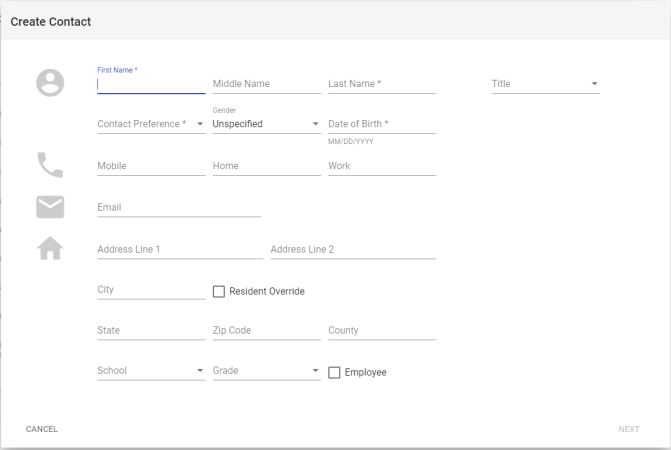
First Name, Last Name, Contact Preference and Date of Birth are required. The Contact Preference selection drives the remaining entries required.
After completing the information in this dialog, click NEXT.
If the first and last name and one other item on the dialog match another contact already in the system, a duplicate prevention dialog opens, showing the new contact on the left and the original one on the right. If an entry on the new contact duplicates one on the original, a Same as new contact tag appears to the right of the duplicate entry on the original:
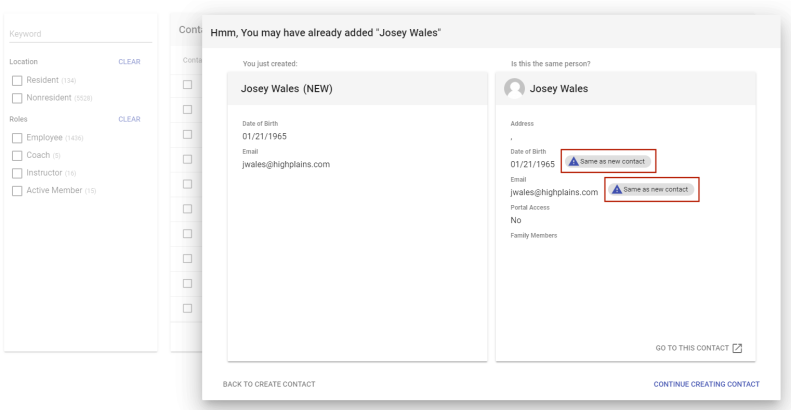
From the duplicate prevention dialog, you have the options to navigate to the Contact Details page of the original contact, return to the Create Contact dialog or continue the process of creating the new contact:
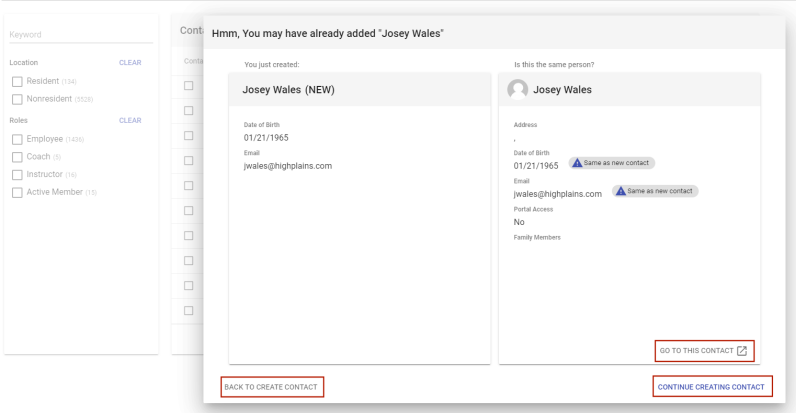
- GO TO THIS CONTACT: This link discards the new contact and takes you to the Contact Management page of the original contact. A confirmation dialog asks you to confirm whether you want to proceed to the original contact.
- BACK TO CREATE CONTACT: This link returns you to the Create Contact dialog, with your current entries still in place.
- CONTINUE CREATING CONTACT: This link takes you to the main Contact Management page to complete the contact create process.